
My Website Was Almost Taken Down (And I Didn’t Touch a Line of Code)
I woke up one morning feeling quietly optimistic.
I was in the final stretch of preparing to launch Hey Harvey, a product I’d been building frantically over the last few months. The website was live, the blog was ticking along nicely, and everything felt…stable. No fires. No alerts. No red dashboards glaring at me.
And then I opened my email.
What I saw was a message from Netlify informing me that all my deployments had been paused.
Not slowed down, not rate-limited, but paused.
The reason?
“Your functions have exceeded 150% of the monthly usage limit.”
I stared at the screen, genuinely confused.
I hadn’t deployed anything new.
I hadn’t changed a line of code.
I hadn’t launched yet.
And traffic to my blog looked… normal.
Or so I thought.
The calm before the spike
My blog runs on a fairly modern stack. It’s a Next.js site backed by Sanity, hosted on Netlify. Nothing exotic. Nothing experimental. A setup thousands of developers use every day.
For weeks, it behaved exactly as expected. Then, over the space of about 48 hours, everything went sideways.
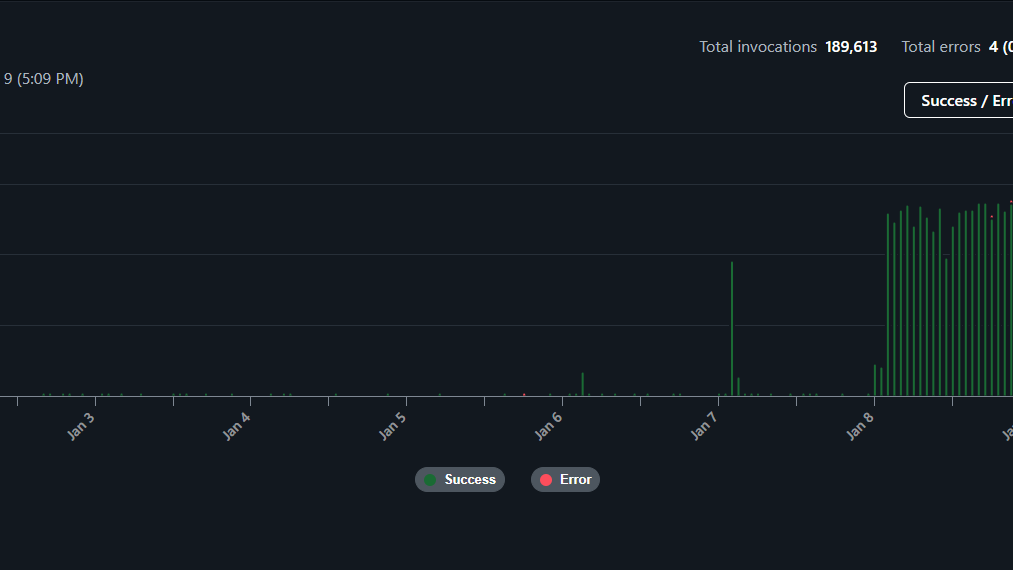
Netlify’s usage graphs told a different story than Google Analytics ever could.
Function invocations went from reasonable to absurd. A smooth curve turned into a vertical wall. Nearly 190,000 serverless function executions appeared out of nowhere.
This wasn’t a gentle rise in readership. This was something else entirely.
And the worst part?
Every single one of those requests was waking up my Next.js Server Handler, which meant money, resources, and quotas were being burned on every hit.
That’s when Netlify did what it’s designed to do: it froze everything to protect me from unexpected overage charges.
Helpful, yes.
Convenient, absolutely not.
Especially when you’re days away from a launch.
The first assumption: “I must have broken something”
If you’ve ever run a production site, you’ll recognise this instinct.
My first thought was: What did I mess up?
Maybe I accidentally forced server-side rendering everywhere. Maybe I disabled caching. Maybe a revalidation loop went rogue. So I checked:
- recent commits,
- deployment logs,
- function errors,
- runtime durations.
Nothing.
The functions were healthy. Fast. Predictable. No crashes. No anomalies.
Which raised a far more uncomfortable possibility. This wasn’t a bug. This was traffic.
The uncomfortable truth about modern traffic
We tend to think of traffic as people.
Readers. Users. Customers.
But in 2026, a huge portion of internet traffic is not human at all. Its automated systems. Crawlers. Indexers. Scrapers. Bots of every shape and intent.
Some are useful. Some are neutral. Some are quietly expensive.
And some… are relentless.
What I was seeing didn’t look like a viral post or a surge of interest. It looked mechanical. Even. Tireless. The kind of activity that doesn’t sleep.
So I did what any rational developer does when things stop making sense. I asked for help.
The investigation that changed everything
I opened a support ticket with Netlify and explained the situation clearly:
- No code changes
- Sudden spike
- All traffic hitting serverless functions
- Strong suspicion of automated crawling
To their credit, Netlify took it seriously.
A short while later, I received a response that made me laugh and sigh at the same time.
They had identified the source.
Not users. Not hackers. Not misconfiguration.
AI crawlers.
The biggest offender by a massive margin?
GPTBot
Yes. That GPTBot. The crawler associated with OpenAI.
It alone was responsible for nearly 190,000 requests, each one triggering a serverless function execution.
In other words, an AI was enthusiastically reading my blog, over and over, and quietly burning through my monthly quota while doing so.
The irony was almost poetic.
Why this is happening more often than people realize
Traditional search engine crawlers are relatively polite. They cache aggressively. They respect crawl budgets. They tend not to hammer dynamic routes unnecessarily.
AI crawlers are different. They:
- crawl deeper,
- revisit more frequently,
- often hit server-rendered pages repeatedly,
- and don’t care whether a page costs you money to generate.
From their perspective, they’re just gathering data.
From your perspective, they might be waking up a serverless function 190,000 times.
And if you’re on a free or low-tier plan, that adds up frighteningly fast.
The moment I realized this wasn’t my fault
There’s a strange relief in learning that something is not your mistake.
Once Netlify confirmed that the traffic was automated and abnormal, two things became clear:
- I hadn’t broken my site.
- This could happen to anyone running a modern SSR-based blog.
Netlify even unpaused my account so I could take corrective action, which I genuinely appreciated.
But now I had a new responsibility. I needed to defend my site.
Step one: stop the bots before they reach the site
The first layer of protection was to ensure that obvious junk traffic never even reached my application.
I added edge-level rules to block common scanner paths. These are the kinds of URLs bots probe automatically, regardless of what your site actually is.
This doesn’t solve AI crawling entirely, but it cuts down a surprising amount of noise.
Step two: put a bouncer in front of the door
The real turning point was putting Cloudflare in front of my blog. Cloudflare now sits between the internet and my hosting provider, acting as a gatekeeper.
With a few careful settings:
- Bot Fight Mode enabled
- A moderate security level
- A small set of targeted WAF rules
I was able to stop most automated traffic before it ever touched Netlify.
This is important because once a request hits your hosting platform, it’s already costing you something.
Blocking at the edge is cheaper. Smarter. Safer.
Step three: telling AI crawlers “no, thank you”
There’s an old and often misunderstood tool on the web called robots.txt. It doesn’t block malicious bots. It doesn’t stop scrapers that ignore rules.
But it does communicate intent to well-behaved crawlers.
I added explicit rules telling AI crawlers that they were not welcome to index my content.
Some people are philosophically opposed to this. I understand that debate.
But I also believe that consent matters, and so does sustainability.
If an AI system wants to learn from my work, I’d like that to happen in a way that doesn’t take my site offline.
The bigger lesson: serverless isn’t “free”
One of the quiet myths of modern web development is that serverless is essentially free until you’re huge.
That’s not true.
Serverless is cheap, but it’s not free. And it is especially sensitive to, unexpected traffic, aggressive crawlers, and pages that render dynamically on every request.
If you’re running:
- Next.js with SSR,
- dynamic blog routes,
- preview endpoints,
- or revalidation hooks,
…you are far more exposed than you might realize.
Why I’m writing this
I’m sharing this story because I suspect many founders, developers, and content creators are sleepwalking into the same problem.
You don’t need a viral post, a malicious attack, or a broken deploy.
All you need is a public site, server-side rendering, and an AI crawler that decides you’re interesting.
That’s it.
Where I landed after the dust settled
Today, my site is:
- protected at the edge,
- explicit about which crawlers are welcome,
- and far more resilient than it was before.
I can upgrade plans with confidence. I can launch without fear of surprise pauses. And I have a much deeper respect for the invisible traffic moving across the web. This incident didn’t delay my launch in the end. It strengthened it.
Final thoughts
If you run a modern website, especially one built with serverless frameworks, I encourage you to look at your hosting usage dashboards, understand where your traffic really comes from, and assume that AI crawlers are already visiting you.
Because they probably are. And they don’t knock.